Extending Layer2 across Datacenters using Locator Identity Separation Protocol (LISP)’s!
The Locator Identity Separation Protocol (LISP) is a new routing architecture that creates a new paradigm by splitting the device identity, known as an Endpoint Identifier (EID), and its location, known as its Routing Locator (RLOC), into two different numbering spaces. This capability brings renewed scale and flexibility to the network in a single protocol, enabling the areas of mobility, scalability and security.

In this architecture, there is clear separation between “who” the endpoint is, and “where” the endpoint currently is located. By separating EIDs and RLOCs, LISP inherently enables numerous benefits within a single protocol, including:
Low OpEx multihoming with ingress traffic engineering Address familiy independence for efficient IPv6 Transition support High-scale Virtualization/Multi-tenancy support Data Center/Cloud Mobility support, including session persistence across mobility events and seamless mobile node support.
Components Involved
EID (Endpoint Identifier) - IP address of a host RLOC (Routing Locator) - IP address of the LISP router facing ISP
ITR (Ingress Tunnel Router) - Sends map requests and processes received map replies in order to resolve EID-to-RLOC mappings. On the data plane side, an ITR receives packets from site-facing interfaces and either LISP-encapsulates packets to remote LISP sites, or natively forwards packets to non-LISP sites.
ETR (Egress Tunnel Router) - Registers its EID prefixes and RLOCs with the Map-Server, and responds to map requests received from the Map-Server. On the data plane side, an ETR receives packets from core-facing interfaces, de-encapsulates them, and delivers them to local EIDs at the site.
xTR - Performs both ITR/ETR functions.
PxTR - (Proxy xTR) Accepts encapsulated traffic from LISP sites and forwards natively to non-LISP sites. Draw non-LISP traffic to itself by announcing aggregates of EID prefixes to non-LISP core.
MS (Map Server) - An MS receives Map-Registration messages from LISP sites. It also receives Map-Requests (via the Mapping System) seeking mapping resolutions for EID prefixes and forwards them to the registered ETR that is authoritative for the EID prefix being queried.
MR (Map Resolver) - An MR receives map requests from ITRs and forwards them to the Mapping System (resulting in an MS receiving the Map-Request). An MR also sends negative map replies to ITRs in response to queries for non-LISP addresses.
EID-to-RLOC Mapping
The key to using these RLOCs and EIDs is the mapping between them. A device (S1) communicating with another device (D1) will create a packet with the EID of S1 as the source IP address and the EID of D1 as the destination IP address.

At the edge of the network, when this packet needs to be routed to the Internet, an ingress tunnel router maps the destination EID to a destination RLOC and then encapsulates the original packet with an additional header that has the source IP address of the ITR RLOC and the destination IP address of the RLOC of an egress tunnel router that connects to D1. LISP specifies the way that the mappings between EIDs and RLOCs are defined, exchanged, and used.
“LISP” refers to the protocol used for exchanging EID-to-RLOC mapping information, the overall architecture includes two additional components: a mapping database, which consists of devices and procedures for distributing mapping information, and additional devices for implementing interworking between LISP-capable and non-LISP-capable parts of the Internet.
Map-Request: This message is sent by an ITR to the mapping database when it needs to send a packet to a destination EID for which is has no cached RLOC.
Map-Reply: This message is returned to an ITR by an ETR or map server in response to a Map-Request message. A Map-Reply message contains the EID prefix that matches the requested destination EID along with a set of RLOCs that can be used as the destination IP addresses for encapsulating user data. Additional information regarding priority and traffic-distribution across multiple RLOCs is also returned.
LISP xTR Encap Rules:
Perform destination address lookup in the normal routing table, if the route matched is one of the following proceed with LISP encap process, otherwise forward natively:
default route (0.0.0.0/0 or ::/0) no route a route with a Null0 next-hop
Check if the source address of the packet is within a local EID prefix.
If yes, the packet is eligible for LISP encapsulation.
If no, the packet is not eligible for LISP encapsulation, and will get forwarded natively.
Perform lookup in map-cache, if entry found perform forwarding action (encap, drop, send-map-request or fwd-native), if no entry found forward natively. (As LISP control component installs default map-cache entry with action send-map-request, we will never get a miss).
4)If the action is to forward, then the packet is encapsulated and a destination address lookup is performed on the destination/remoteRLOC, and once the output interface is known, the source RLOC is filled in.
LISP Data Packet Header Format
Encapsulated user data packets are transported using UDP port 4341, and LISP control packets are transported using UDP port 4342.
Map-Register: This message is sent by an ETR to a map server to define an EID prefix that it owns as well as the RLOCs that should be used for exchanging Map-Request and Map-Reply messages. The registration request includes the EID prefix, prefix length, RLOCs associated with the prefix, and priorities and traffic-sharing weights of each RLOC. Map-Register messages are sent periodically to maintain the registration state between an ETR and its map servers.
LISP xTR Encap Rules:
Perform destination address lookup in the normal routing table, if the route matched is one of the following proceed with LISP encap process, otherwise forward natively:
default route (0.0.0.0/0 or ::/0) no route a route with a Null0 next-hop
Check if the source address of the packet is within a local EID prefix.
If yes, the packet is eligible for LISP encapsulation.
If no, the packet is not eligible for LISP encapsulation, and will get forwarded natively.
Perform lookup in map-cache, if entry found perform forwarding action (encap, drop, send-map-request or fwd-native), if no entry found forward natively. (As LISP control component installs default map-cache entry with action send-map-request, we will never get a miss).
4)If the action is to forward, then the packet is encapsulated and a destination address lookup is performed on the destination/remoteRLOC, and once the output interface is known, the source RLOC is filled in.
LISP Data Packet Header Format

Encapsulated user data packets are transported using UDP port 4341, and LISP control packets are transported using UDP port 4342.
LISP Map-Register Header Format

Network Configuration
The network is configured as follows:
The PCs are configured with IP addresses in the 11.11.11.0/24 subnet.
- The vEDGE01 router is configured with the following interfaces:
GiagbitEthernet1(10.16.201.2/30): This interface connects to the vEDGE02 - GigabitEthernet1 - 10.16.201.1/30.
GiagbitEthernet2(11.11.11.254/30) This interface connects to the PC1 - eth0 - 11.11.11.11/24.
Loopback0(200.1.247.1/32): This interface is used to establish dynamic Routing and LISP.
Tunnel2(1.1.247.1/32): This interface is used to establis IPSec tunnel using VTI.
- The vEDGE02 router is configured with the following interfaces:
GiagbitEthernet1(10.16.201.1/30): This interface connects to the vEDGE01 - GigabitEthernet1 - 10.16.201.2/30.
GiagbitEthernet2(11.11.11.253/30) This interface connects to the PC1 - eth0 - 11.11.11.12/24.
Loopback0(200.1.247.2/32): This interface is used to establish dynamic Routing and LISP.
Tunnel2(1.1.247.2/32): This interface is used to establis IPSec tunnel using VTI.
Lab Documentation: Extending Layer2 across Datacenters using Locator Identity Separation Protocol (LISP)’s!
This document describes a network lab setup with two PCs (PC1, and PC2), a vEDGE router cisco 8000v (IoS XE), IPSec Site 2 Site Tunnel using SVTI, LISP and OSPF The lab demonstrates routing, connectivity, and L2 Extension across DC’s using LISP and OSPF functionalities.
Hardware and Software:
VMware Workstation
EVE-NG Community Edition
Host-only network adapters - with EVE-NG networking
NAT adpater - EVE-NG to be access through browser
cisco 8000v - IOS XE images
Linux Tiny core for PC’s
Lab Setup:
Download the VMware workstation or fusion for flavour of the operating system or if you have VMWare ESXi server then follow the below steps to provision the VM. * System Requirement * Minimum RAM: 12G * Processor: 2 * HDD: 30G
Install the VMWare software in accordance to your operating system by following the installation guide.
Download the prebuild EVE-NG lab OVF file from the Google Drive.
Extract or unzip the file using zip extractor or windows default zip
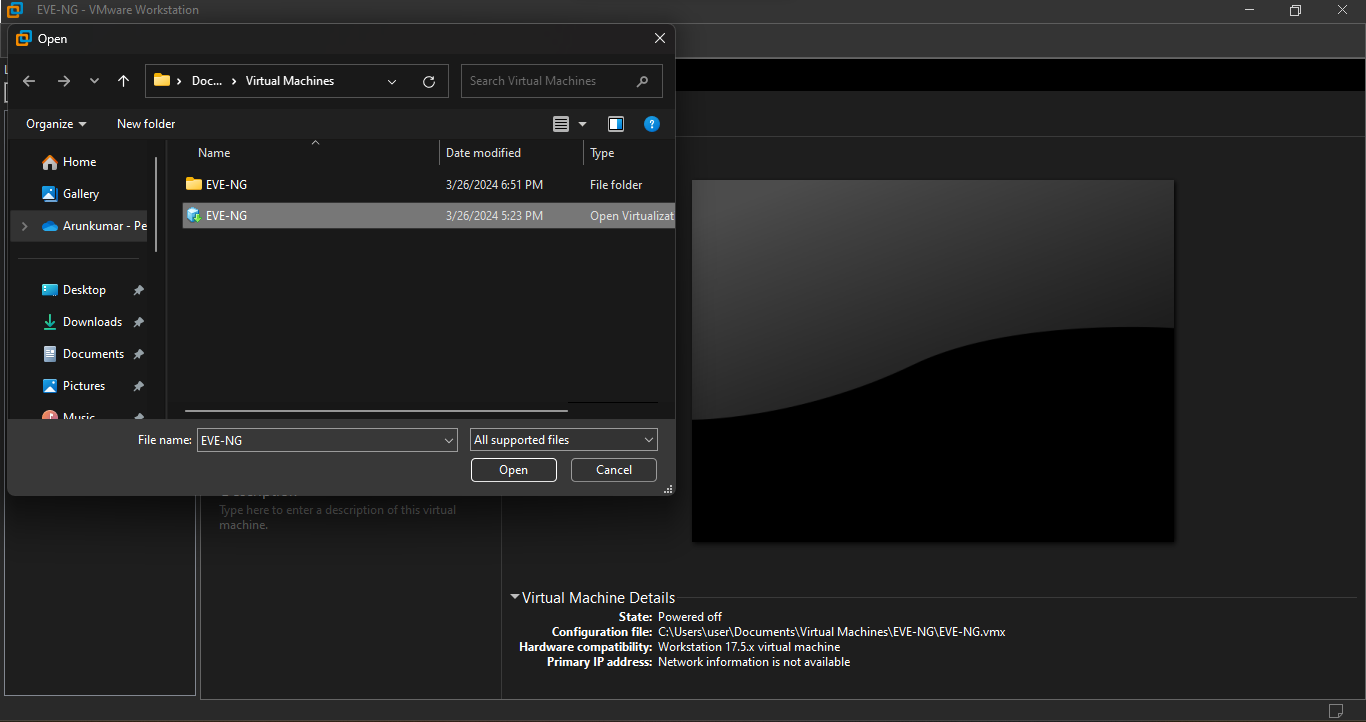
Import the OVF as below
Starting the VMWare workstation application will open a dash board as below,

Click on the file menu on the Top bar, to list the available menus,

Click on the open menu on the DropDwon List, which will allow you choose the file to import, navigate to the location where you have downloaded and extracted the OVF files.
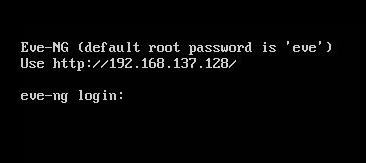
Start the Virtual Machine by click on the start button, upon successful boot the below window appears with an ip address.
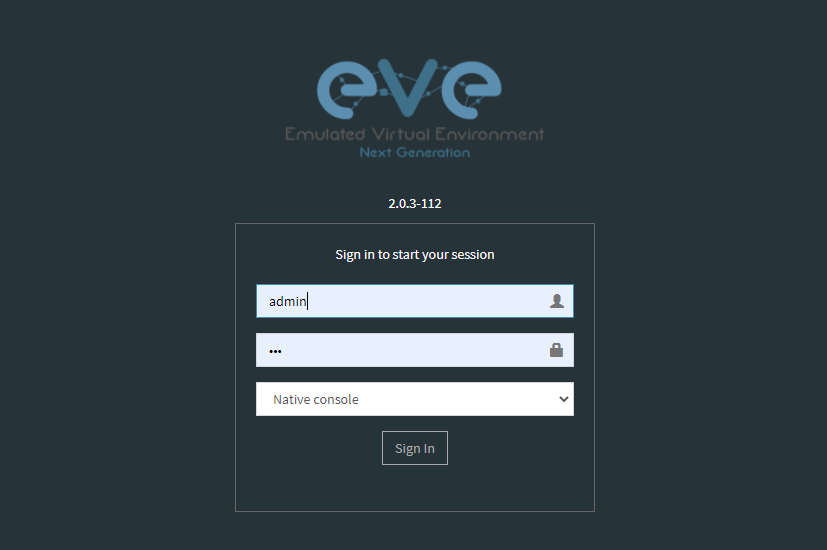
Open your faviroute and type the IP address show on the above screen to access the Admin GUI.
username: admin
password: eve
Choose HTML5 as console for ease access
On the EVE-NG, Admin Dashboard look for LISP.unl and click on open lab.

On the Lab Right Click and select start on the vEDGE-DC01, vEDGE-DC02, PC01 and PC02 to power on the routers and pc’s.

Double click on the network components such as Routers, Switches and PC’s to open HTML5 based terminal.
The configuration file for vEDGE01 and vEDGE02 are as below
Download the scripts from : https://github.com/arunkumaruniqpro/LISP
1. On pc1
- Set up IP settings as follows:
IP address: 11.11.11.11
Subnet Mask: 255.255.255.0
Gateway: 11.11.11.254
2. On pc2
- Set up IP settings as follows:
IP address: 11.11.11.12
Subnet Mask: 255.255.255.0
Gateway: 11.11.11.253
3. On vEDG01 - Crypto Configuration and Verification
!
crypto ikev2 proposal ikev2_proposal
encryption aes-cbc-128 integrity sha1 group 14
!
crypto ikev2 policy ikev2_policy
proposal ikev2_proposal
!
crypto ikev2 keyring ikev2_keyring
peer vEDGE01
address 10.16.201.1 pre-shared-key local cisco pre-shared-key remote cisco
!
crypto ikev2 profile ikve2_profile
match identity remote address 10.16.201.1 255.255.255.252 identity local address 10.16.201.2 authentication remote pre-share authentication local pre-share keyring local ikev2_keyring
!
crypto ipsec transform-set ipsec_transform1 esp-aes 256 esp-sha512-hmac
mode tunnel
!
crypto ipsec profile p2p_pf1
set transform-set ipsec_transform1 set ikev2-profile ikve2_profile
!
verification
vEDGE01#sh crypto ikev2 proposal
 IKEv2 proposal: default
     Encryption : AES-CBC-256
     Integrity  : SHA512 SHA384
     PRF        : SHA512 SHA384
     DH Group   : DH_GROUP_256_ECP/Group 19 DH_GROUP_2048_MODP/Group 14 DH_GROUP_521_ECP/Group 21 DH_GROUP_1536_MODP/Group 5
 IKEv2 proposal: ikev2_proposal
     Encryption : AES-CBC-128
     Integrity  : SHA96
     PRF        : SHA1
     DH Group   : DH_GROUP_2048_MODP/Group 14

vEDGE01#sh crypto ikev2 policy
 IKEv2 policy : default
      Match fvrf : any
      Match address local : any
      Proposal    : default
 IKEv2 policy : ikev2_policy
      Match fvrf  : global
      Match address local : any
      Proposal    : ikev2_proposal

vEDGE01#sh crypto ikev2 profile
IKEv2 profile: ikev2_profile
 Shutdown : No
 Ref Count: 5
 Match criteria:
  Fvrf: global
  Local address/interface: none
  Identities:
   address 10.16.201.1 255.255.255.252
  Certificate maps: none
 Local identity: address 10.16.201.2
 Remote identity: none
 Local authentication method: pre-share
 Remote authentication method(s): pre-share
 EAP options: none
 Keyring: ikev2_keyring
 Trustpoint(s): none
 Lifetime: 86400 seconds
 DPD: disabled
 NAT-keepalive: disabled
 Ivrf: none
 Virtual-template: none
 mode auto: none
 AAA AnyConnect EAP authentication mlist: none
 AAA EAP authentication mlist: none
 AAA authentication mlist: none
 AAA Accounting: none
 AAA group authorization: none
 AAA user authorization: none

vEDGE01#sh crypto ipsec transform-set
Transform set default: { esp-aes esp-sha-hmac  }
   will negotiate = { Transport,  },

Transform set ipsec_transform1: { esp-256-aes esp-sha512-hmac  }
   will negotiate = { Tunnel,  },

vEDGE01#sh crypto ipsec profile
IPSEC profile default
Security association lifetime: 4608000 kilobytes/3600 seconds
Dualstack (Y/N): N
Responder-Only (Y/N): N
PFS (Y/N): N
Mixed-mode : Disabled
Transform sets={
default:  { esp-aes esp-sha-hmac  } ,
}
IPSEC profile p2p_pf1
IKEv2 Profile: ikev2_profile
Security association lifetime: 4608000 kilobytes/3600 seconds
Dualstack (Y/N): N
Responder-Only (Y/N): N
PFS (Y/N): N
Mixed-mode : Disabled
Transform sets={
ipsec_transform1:  { esp-256-aes esp-sha512-hmac  } ,
}
4. On vEDG01 - Interface Configuration and Verification
interface Loopback0
 ip address 200.1.247.1 255.255.255.255

interface Tunnel2
 ip address 1.1.247.1 255.255.255.252
 ip mtu 1400
 ip tcp adjust-mss 1360
 tunnel source GigabitEthernet1
 tunnel mode ipsec ipv4
 tunnel destination 10.16.201.1
 tunnel protection ipsec profile p2p_pf1

interface LISP0

interface GigabitEthernet1
 ip address 10.16.201.2 255.255.255.252
 negotiation auto
 no mop enabled
 no mop sysid

interface GigabitEthernet2
 ip address 11.11.11.254 255.255.255.0
 negotiation auto
 lisp mobility subnet1 nbr-proxy-reply requests 3
 no mop enabled
 no mop sysid
verification
vEDGE01#sh ip int bri
Interface              IP-Address      OK? Method Status                Protocol
GigabitEthernet1       10.16.201.2     YES NVRAM  up                    up
GigabitEthernet2       11.11.11.254    YES manual up                    up
GigabitEthernet3       unassigned      YES NVRAM  administratively down down
GigabitEthernet4       unassigned      YES NVRAM  administratively down down
LISP0                  200.1.247.1     YES unset  up                    up
Loopback0              200.1.247.1     YES manual up                    up
Tunnel2                1.1.247.1       YES manual up                    up
5. On vEDG01 - LISP & OSPF Configuration and Verification
router lisp
 locator-set s2s
  200.1.247.1 priority 1 weight 100
  exit-locator-set

 service ipv4
  itr map-resolver 200.1.247.2
  itr
  etr map-server 200.1.247.2 key cisco
  etr
  use-petr 200.1.247.2
  exit-service-ipv4

 instance-id 0
  dynamic-eid subnet1
   database-mapping 11.11.11.0/24 locator-set s2s
   map-notify-group 239.0.0.1
   exit-dynamic-eid

  service ipv4
   eid-table default
   exit-service-ipv4

  exit-instance-id

 exit-router-lisp

router ospf 11
 network 1.1.247.1 0.0.0.0 area 11
 network 200.1.247.1 0.0.0.0 area 11
verification
vEDGE01#sh ip lisp map-cache
-----------------------------------------------
 <show ip/ipv6 lisp (instance-id <0-16777200>)
 map-cache command is depreciated.
 Please use <show lisp instance-id <0-16777200>
 ipv4/ipv6 map-cacheto get desired information.
------------------------------------------------
LISP IPv4 Mapping Cache for LISP 0 EID-table default (IID 0), 3 entries
11.11.11.0/24, uptime: 03:49:07, expires: never, via dynamic-EID, send-map-request
  Negative cache entry, action: send-map-request
11.11.11.11/32, uptime: 02:56:07, expires: 21:03:52, via map-reply, complete
  Locator      Uptime    State  Pri/Wgt     Encap-IID
  200.1.247.1  02:56:07  up       1/100       -
11.11.11.128/25, uptime: 02:58:00, expires: 00:00:17, via map-reply, forward-native
  Negative cache entry, action: forward-native
vEDGE01#sh ip lisp database
-------------------------------------------------------
 <show ip/ipv6 lisp (instance-id <0-16777200>) database
 (EID-Prefix list)> commands are depreciated.

 Please use <show lisp instance-id <0-16777200>
 ipv4/ipv6 database (EID-Prefix list)> to get desired
 information.
--------------------------------------------------------
LISP ETR IPv4 Mapping Database for LISP 0 EID-table default (IID 0), LSBs: 0x1
Entries total 1, no-route 0, inactive 0, do-not-register 0
11.11.11.12/32, dynamic-eid subnet1, inherited from default locator-set dmz
  Uptime: 02:58:11, Last-change: 02:58:11
  Domain-ID: local
  Service-Insertion: N/A
  Locator      Pri/Wgt  Source     State
  200.1.247.2    1/100  cfg-addr   site-self, reachable

vEDGE01# sh ip ospf nei
Neighbor ID     Pri   State           Dead Time   Address         Interface
200.1.247.1       0   FULL/  -        00:00:37    1.1.247.1       Tunnel2
6. On vEDG02 - Crypto Configuration and Verification
!
crypto ikev2 proposal ikev2_proposal
 encryption aes-cbc-128
 integrity sha1
 group 14
!
crypto ikev2 policy ikev2_policy
 proposal ikev2_proposal
!
crypto ikev2 keyring ikev2_keyring
 peer vEDGE01
  address 10.16.201.2
  pre-shared-key local cisco
  pre-shared-key remote cisco
 !
!
!
crypto ikev2 profile ikve2_profile
 match identity remote address 10.16.201.2 255.255.255.252
 identity local address 10.16.201.1
 authentication remote pre-share
 authentication local pre-share
 keyring local ikev2_keyring
!
!
!
!
!
!
!
!
!
!
!
!
!
crypto ipsec transform-set ipsec_transform1 esp-aes 256 esp-sha512-hmac
 mode tunnel
!
!
crypto ipsec profile p2p_pf1
 set transform-set ipsec_transform1
 set ikev2-profile ikve2_profile
!
verification
vEDGE02#sh crypto ikev2 proposal
 IKEv2 proposal: default
     Encryption : AES-CBC-256
     Integrity  : SHA512 SHA384
     PRF        : SHA512 SHA384
     DH Group   : DH_GROUP_256_ECP/Group 19 DH_GROUP_2048_MODP/Group 14 DH_GROUP_521_ECP/Group 21 DH_GROUP_1536_MODP/Group 5
 IKEv2 proposal: ikev2_proposal
     Encryption : AES-CBC-128
     Integrity  : SHA96
     PRF        : SHA1
     DH Group   : DH_GROUP_2048_MODP/Group 14
vEDGE02#sh crypto ikev2 policy
 IKEv2 policy : default
      Match fvrf : any
      Match address local : any
      Proposal    : default
 IKEv2 policy : ikev2_policy
      Match fvrf  : global
      Match address local : any
      Proposal    : ikev2_proposal
vEDGE02#sh crypto ikev2 profile
IKEv2 profile: ikev2_profile
 Shutdown : No
 Ref Count: 5
 Match criteria:
  Fvrf: global
  Local address/interface: none
  Identities:
   address 10.16.201.2 255.255.255.252
  Certificate maps: none
 Local identity: address 10.16.201.1
 Remote identity: none
 Local authentication method: pre-share
 Remote authentication method(s): pre-share
 EAP options: none
 Keyring: ikev2_keyring
 Trustpoint(s): none
 Lifetime: 86400 seconds
 DPD: disabled
 NAT-keepalive: disabled
 Ivrf: none
 Virtual-template: none
 mode auto: none
 AAA AnyConnect EAP authentication mlist: none
 AAA EAP authentication mlist: none
 AAA authentication mlist: none
 AAA Accounting: none
 AAA group authorization: none
 AAA user authorization: none
vEDGE01#sh crypto ipsec transform-set
Transform set default: { esp-aes esp-sha-hmac  }
   will negotiate = { Transport,  },
Transform set ipsec_transform1: { esp-256-aes esp-sha512-hmac  }
   will negotiate = { Tunnel,  },
vEDGE01#sh crypto ipsec profile
IPSEC profile default
Security association lifetime: 4608000 kilobytes/3600 seconds
Dualstack (Y/N): N
Responder-Only (Y/N): N
PFS (Y/N): N
Mixed-mode : Disabled
Transform sets={
default:  { esp-aes esp-sha-hmac  } ,
}
IPSEC profile p2p_pf1
IKEv2 Profile: ikev2_profile
Security association lifetime: 4608000 kilobytes/3600 seconds
Dualstack (Y/N): N
Responder-Only (Y/N): N
PFS (Y/N): N
Mixed-mode : Disabled
Transform sets={
ipsec_transform1:  { esp-256-aes esp-sha512-hmac  } ,
}
4. On vEDG02 - Interface Configuration and Verification
!
interface Loopback0
 ip address 200.1.247.2 255.255.255.255
!
interface Tunnel2
 ip address 1.1.247.2 255.255.255.252
 ip mtu 1400
 ip tcp adjust-mss 1360
 tunnel source GigabitEthernet1
 tunnel mode ipsec ipv4
 tunnel destination 10.16.201.1
 tunnel protection ipsec profile p2p_pf1
!
interface LISP0
!
interface GigabitEthernet1
 ip address 10.16.201.1 255.255.255.252
 negotiation auto
 no mop enabled
 no mop sysid
!
interface GigabitEthernet2
 ip address 11.11.11.253 255.255.255.0
 negotiation auto
 lisp mobility subnet1 nbr-proxy-reply requests 3
 no mop enabled
 no mop sysid
!
verification
vEDGE01#sh ip int bri
Interface              IP-Address      OK? Method Status                Protocol
GigabitEthernet1       10.16.201.1     YES NVRAM  up                    up
GigabitEthernet2       11.11.11.253    YES manual up                    up
GigabitEthernet3       unassigned      YES NVRAM  administratively down down
GigabitEthernet4       unassigned      YES NVRAM  administratively down down
LISP0                  200.1.247.2     YES unset  up                    up
Loopback0              200.1.247.2     YES manual up                    up
Tunnel2                1.1.247.2       YES manual up                    up
5. On vEDG02 - LISP & OSPF Configuration and Verification
!
router lisp
 locator-set dmz
  200.1.247.2 priority 1 weight 100
  exit-locator-set
 !
 service ipv4
  itr map-resolver 200.1.247.2
  etr map-server 200.1.247.2 key cisco
  etr
  proxy-etr
  proxy-itr 200.1.247.2
  map-server
  map-resolver
  exit-service-ipv4
 !
 instance-id 0
  dynamic-eid subnet1
   database-mapping 11.11.11.0/24 locator-set dmz
   map-notify-group 239.0.0.1
   exit-dynamic-eid
  !
  service ipv4
   eid-table default
   exit-service-ipv4
  !
  exit-instance-id
 !
 site DATA_CENTER
  authentication-key cisco
  eid-record 11.11.11.0/24 accept-more-specifics
  exit-site
 !
 exit-router-lisp
!
router ospf 11
 network 1.1.247.2 0.0.0.0 area 11
 network 200.1.247.2 0.0.0.0 area 11
!
verification
vEDGE02#sh ip lisp map-cache
-----------------------------------------------------------
 <show ip/ipv6 lisp (instance-id <0-16777200>)
 map-cache command is depreciated.

 Please use <show lisp instance-id <0-16777200>
 ipv4/ipv6 map-cacheto get desired information.
------------------------------------------------------------
LISP IPv4 Mapping Cache for LISP 0 EID-table default (IID 0), 3 entries
0.0.0.0/0, uptime: 03:11:05, expires: never, via static-send-map-request
  Negative cache entry, action: send-map-request
11.11.11.0/24, uptime: 03:44:18, expires: never, via dynamic-EID, send-map-request
  Negative cache entry, action: send-map-request
11.11.11.12/32, uptime: 03:11:00, expires: 20:48:59, via map-reply, complete
  Locator      Uptime    State  Pri/Wgt     Encap-IID
  200.1.247.2  03:11:00  up       1/100
vEDGE02#sh ip lisp database
-----------------------------------------------------------
 <show ip/ipv6 lisp (instance-id <0-16777200>) database
 (EID-Prefix list)> commands are depreciated.
 Please use <show lisp instance-id <0-16777200>
 ipv4/ipv6 database (EID-Prefix list)> to get desired
 information.
------------------------------------------------------------
LISP ETR IPv4 Mapping Database for LISP 0 EID-table default (IID 0), LSBs: 0x1
Entries total 1, no-route 0, inactive 0, do-not-register 0
11.11.11.11/32, dynamic-eid subnet1, inherited from default locator-set s2s
  Uptime: 03:11:55, Last-change: 03:11:55
  Domain-ID: local
  Service-Insertion: N/A
  Locator      Pri/Wgt  Source     State
  200.1.247.1    1/100  cfg-addr   site-self, reachable
vEDGE02#sh ip ospf nei
Neighbor ID     Pri   State           Dead Time   Address         Interface
200.1.247.2       0   FULL/  -        00:00:30    1.1.247.2       Tunnel2